
The practical answer
ParallelCals starts at €3/month for two calendars and two active rules, billed monthly. OneCal Starter costs US$6/user/month on monthly billing, or US$60/year. Both can protect availability with private blockers. OneCal offers a trial without a card and larger calendar tiers; ParallelCals provides a focused Busy-block setup with automatic confirmation after the target provider accepts a block.
Written by ParallelCals, one of the products compared; this page is not affiliated with or endorsed by the other vendor. This comparison focuses on availability synchronization, not every feature of either product. Competitor facts were reviewed on October 8, 2026 using the linked public sources; we have not conducted a hands-on benchmark of those products. Screenshots show ParallelCals components with synthetic demo data. EUR and USD are kept separate; no exchange-rate savings claim is made. Confirm taxes and final terms at checkout.
Prices, trial terms and limits
Individual self-service plans, reviewed October 8, 2026. Prices retain each vendor’s currency. Annual equivalents require a yearly payment; check taxes and final checkout terms.
Swipe to compare both products.
| Requirement | ParallelCals | OneCal |
|---|---|---|
| Monthly plans | Starter €3/month: 2 calendars / 2 active rules; Plus €5/month: 4 calendars / 4 active rules; Pro €7/month: 6 calendars / 6 active rules; Power €9/month: 8 calendars / 8 active rules | Starter US$6 (2 calendars), Essential US$12 (5), Premium US$30 (50), per user/month. |
| Annual commitment | The current self-service web plans are billed monthly. | Starter US$60/year; Essential US$120/year; Premium US$300/year. Advertised monthly equivalents require annual billing. |
| Trial and renewal | Eligible first-time Starter subscribers: 14 days, payment method required. Renews at €3/month unless cancelled before renewal. Connecting accounts and previewing are free; live sync needs a plan. Larger plans start paid. | 14-day trial without a credit card; a paid plan is needed afterwards. |
| Calendar coverage | Google, Microsoft cloud calendars (Outlook.com/Microsoft 365), and iCloud. Read-only calendars exposed by a connected provider can be sources; destinations must be writable. No direct public ICS URL connector. | Google, Outlook, iCloud and CalDAV are listed. |
| Directions and allowance | A one-way rule can have several targets; Mirror availability combines selected calendars in one rule. Both calendar and active-rule limits apply. | Unlimited sync configurations within the plan's calendar allowance; one-way and multi-way sync. |
| Private event details | Private Busy blocks by default. Out-of-Office behavior depends on the destination provider. Advanced sync can add selected title, location or meeting-link context; source notes and attendees are not copied. | Choose copied titles, descriptions, participant details, locations and meeting links, or hide details and mark clones private. Participant details go into the clone's description, without new invitations. |
| Scheduling and merged view | Booking links and a merged calendar view are included. | Unlimited scheduling links and a unified calendar view are included. |
| Update timing | Supported Google and Microsoft calendars use provider notifications plus reconciliation. iCloud and imported Google calendars use scheduled checks. The standard window is now to +60 days; no instant-sync guarantee. | Markets real-time updates; its sync FAQ allows up to 10 minutes for iCloud changes. |
Which workflow are you paying for?
For a personal appointment to block your work calendar, both products offer private availability sync. Private blockers are not an exclusive ParallelCals feature. The useful question is whether the plan covers your calendars, permissions and chosen directions.
Consider ParallelCals when you want a monthly subscription for up to eight synced calendars, explicit rule controls and guided confirmation of your first successful block. Consider OneCal when you need its larger calendar allowance, general CalDAV coverage or a card-free trial. OneCal also lists AI, app and integration features beyond this availability-sync comparison; review its full feature table when those matter. For a managed organization, review each product's team and access terms separately.
Example: work, personal and a client calendar
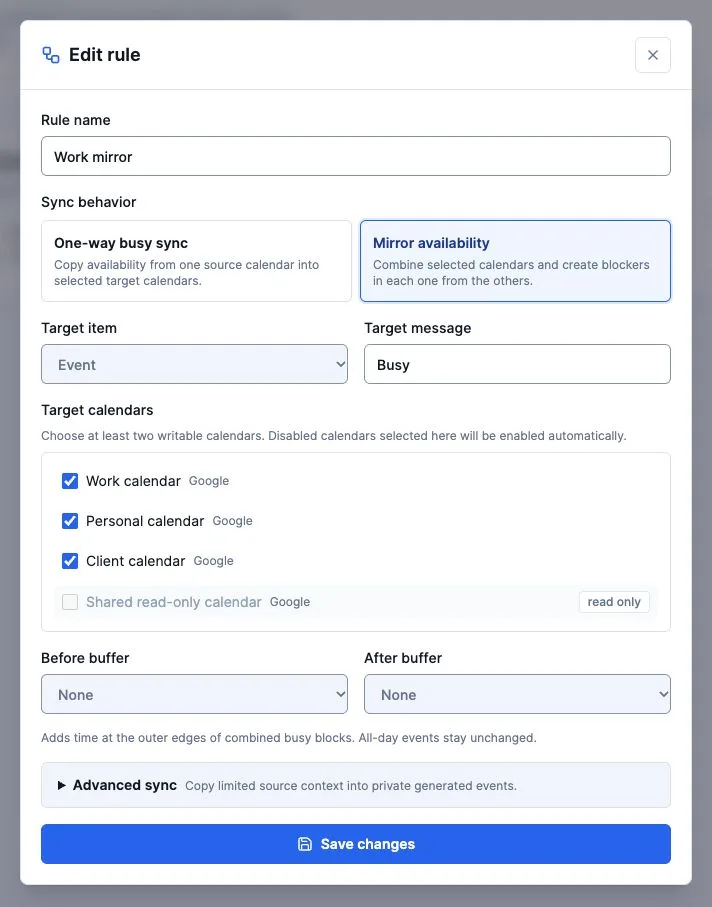
Count calendars, not email accounts: three calendars can belong to one account or three accounts. ParallelCals Plus covers four calendars and four active rules at €5/month. One mirrored rule can combine the three writable calendars; several one-way rules can instead keep chosen directions separate. OneCal Essential covers five calendars with unlimited sync configurations at US$12/user/month or US$120/year, and supports multi-way sync for this setup too.
Draw the desired arrows before subscribing. A personal-to-work rule does not automatically protect the personal calendar from work meetings. Leave source titles, locations and meeting links off where the receiving organization should only see Busy.
Check these limits before switching
- ParallelCals currently mirrors availability inside the next 60 days. It is not an archive migration or a way to edit the original invitation through its blocker. We have not verified OneCal's sync horizon; ask the vendor if longer-range coverage is essential.
- The standard ParallelCals self-service plans cover at most eight synced calendars and eight active rules. Count the whole setup; enabling many rule directions can change the tier you need.
- A read-only source can provide commitments; it cannot receive new blocks. Google Workspace or Microsoft 365 administrators may restrict calendar permissions for either service.
- A private flag does not prevent every administrator or delegate from reading copied fields. Test the destination's actual contents, rather than relying on the flag alone.
Run a small test before moving your rules
- 1
Choose two calendars and one direction
Use an approved source and a writable destination. Pause the existing tool's rule for that pair before enabling the replacement, so two services do not create competing blockers. Review each tool's cleanup options first.
- 2
Preview, then review the checkout
Connect the accounts, select calendars and check the required tier. For ParallelCals, open Account to review Starter trial eligibility, payment method, price and renewal date before activating live sync.
- 3
Create a harmless Busy event tomorrow
Use a short test appointment without attendees. In ParallelCals, return to Setup and wait for provider-confirmed success, or run the available sync check. Inspect the target calendar and its booking availability.
- 4
Move it, then delete it
Confirm the block follows both changes and source details remain absent with Advanced sync off. Keep the old service paused until the test passes. Remove only the test event and use the old service's documented cleanup for its own clones.
See the ParallelCals workflow
This 24-second product tour shows a merged calendar and an availability rule using synthetic demo data.
View the full product tourFrequently asked questions
Is ParallelCals a free OneCal alternative?
Connecting accounts and previewing ParallelCals are free; ongoing live synchronization is paid. Eligible Starter subscribers can use a 14-day trial with a payment method. OneCal advertises a 14-day trial without a card. Compare the terms before starting either trial.
Does OneCal also support private Busy blocks?
Yes. Its public sync page documents hiding source details and marking clones private. In ParallelCals, private Busy blocks are the default; advanced context is optional.
Can I import my OneCal rules automatically?
ParallelCals currently has no OneCal rule importer. Recreate the intended calendars, directions and privacy settings, then test one pair. Do not run both services' rules over the same pair during the switch.
Is Out-of-Office behavior identical across providers?
No. ParallelCals sets Microsoft's Out-of-Office availability status. Google restricts native Out-of-Office events to eligible primary calendars and timed events; choose a regular Busy event for other Google destinations. On iCloud, ParallelCals writes a private Busy event with the chosen title, not a distinct native Out-of-Office status. Busy blocks communicate unavailability; they do not guarantee that every conflicting invitation is rejected.
Sources and documentation
- OneCal: pricing and trial terms
- OneCal: sync controls and iCloud timing
- OneCal: sync directions and participant details
- Google: native Out-of-Office restrictions
ParallelCals instructions were checked against the current application and rule controls. Provider features and policies can change; consult the linked official documentation for your account. Product names belong to their respective owners.